More output. Same team.
Automate everything that doesn't need a person. Your team stops doing the routine and only handles the questions and approvals that need real judgment.
Flight Deck runs the work that doesn't need a person as shared AI workflows — on the tools you already use, across any model, learning from every run. Your team steps in only for the decisions that matter.
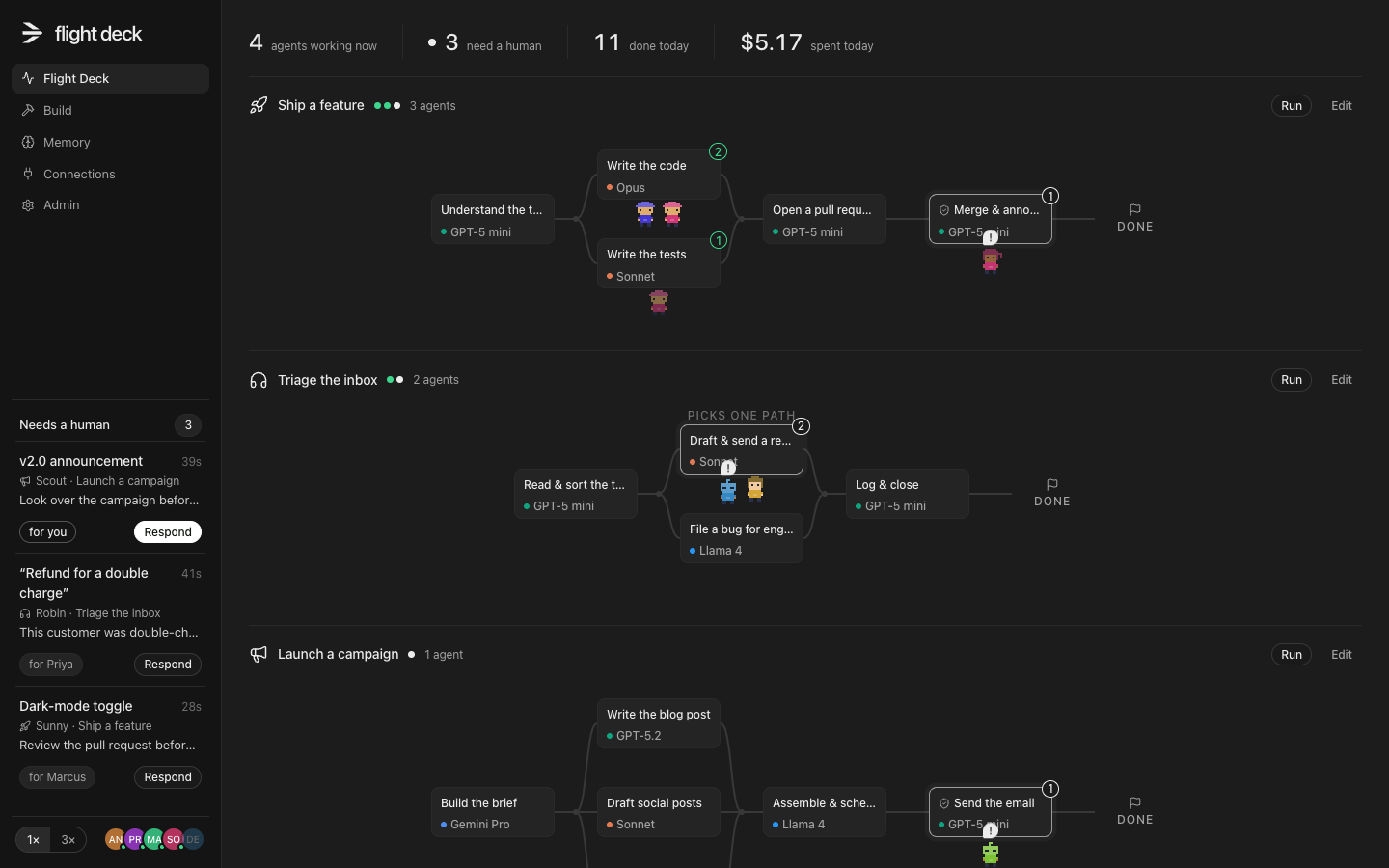
A rehearsal of “Ship a feature”, one of the workflows in the demo. Everything on this page is simulated — the real thing runs on your tools.
Most teams have the same problem: a dozen private AI setups that drift apart, and people spending their day on work that never needed them. Flight Deck turns that work into shared workflows the whole company can see, run and improve.
Automate everything that doesn't need a person. Your team stops doing the routine and only handles the questions and approvals that need real judgment.
No more private AI setups that drift apart. Workflows are shared and run from one place, so when one person makes a step better, it gets better for the whole company.
Connect handbooks, Notion, repos and tickets. Every run reads from the same memory and writes back what it learned — and every note says exactly where it came from.
Each step goes to the cheapest model that can handle it: fast models for routine work, the strongest for the hard parts. You see what every run cost and what routing saved.
Mix models from Anthropic, OpenAI, Google and the open-weights world inside one workflow — or run a model on your own hardware for sensitive steps. Nothing locks you in.
The whole team sees every run. Risky steps wait for a human. Anything the crew needs from you lands in one shared queue, and every action is logged.
Slack, GitHub, Linear, Notion — or any tool that speaks MCP. Connections are shared with the team and used only where a workflow needs them.
Steps in plain words, a brainpower level per step, and a checkpoint wherever a human should look before it runs. Start from a template or a blank page.
Every run is on the floor for the whole team to see. Questions and approvals arrive in one shared queue — answer them and the crew carries on.
Give the crew things to read — handbooks, Notion pages, a repo. It splits each one into passages, makes them searchable, and picks out the names and topics. Notes are what it writes down along the way: which run wrote them, who answered, what they replaced.
One brain for the whole company, instead of a hundred chat histories nobody can find. Nothing is a black box.
The tools you already use — GitHub, Linear, Slack, Notion, your CRM — become systems of record underneath. The work itself, and the decisions about it, move through one shared place that gets smarter every week.
 Open the demo
The demo is a fully simulated workspace: several workflows mid-flight, a couple of items waiting on a human, and every screen you've seen here. Nothing is connected to anything real, so click everything.
We're onboarding a small number of teams first. Tell us a bit about yours and we'll reach out.
Thanks — we'll be in touch soon.